How it works
Two screens on shift.
A throughput delay is the time lost between two steps of a patient's workup. OmniFlowED captures it at the moment it happens, in the language of the department, without touching the chart.
Logging a delay
Locate the case
Zone and room. That is the entire case identifier. Nothing you enter on this screen or any other identifies a patient, which is why a delay log never becomes a record that has to be governed as PHI.
Classify the delay
One of six categories, then a controlled subtype: cardiology consult, troponin, CT final read, ICU bed, transport. Controlled lists mean two physicians logging the same event produce the same row, which is what makes the aggregate worth reading.
Enter the two stage timestamps
Each category defines its own stages: ordered and resulted for a lab, decision and bed-ready for a boarding delay, requested and at-bedside for a consult. You enter the two times; the duration is computed, not estimated.
Name the systemic cause
A contributing factor from a controlled list: no inpatient beds, single overnight tech, pager unanswered, transport backlog, pharmacy verification. Add a severity, flag it if it recurs, and optionally add a note. The note runs a live PHI guard that flags apparent ages, dates and record numbers before you can file.
Choose attribution and file
Named or anonymous, decided on this report, not once at sign-up. Either way the entry routes straight to the administrative queue and stays visible in your own list of reports with its current status.
The taxonomy
What counts as a delay
Six categories, each with the stage timestamps that define its duration. The set comes from the delays that actually recur in a working department rather than from a generic incident schema.
| Category | Stages tracked | Example subtypes |
|---|---|---|
| Provider & consult | Requested → acknowledged → at bedside | Initial evaluation, cardiology, surgery, psychiatry |
| Laboratory | Ordered → drawn → resulted | CBC and chemistry, troponin, cultures, type and screen |
| Imaging acquisition | Ordered → performed | X-ray, CT, MRI, ultrasound |
| Imaging read | Performed → final read | CT, MRI, and the resident-to-final read gap |
| Boarding & disposition | Decision → bed or transfer ready | Floor, telemetry, ICU, transfer out |
| Other throughput | Start → resolved | Registration, transport, pharmacy, EVS, IT and EHR downtime |
Every entry also carries optional ESI acuity, a severity of minor, moderate or significant, a recurring flag, and the contributing factor.
What administration sees
Aggregate, always.
- Overview: open delays, a seven-day trend, significant and recurring counts, and average duration.
- Breakdowns: by category, contributing factor, zone and shift.
- Needs-attention queue: with a status workflow from open through reviewed to resolved.
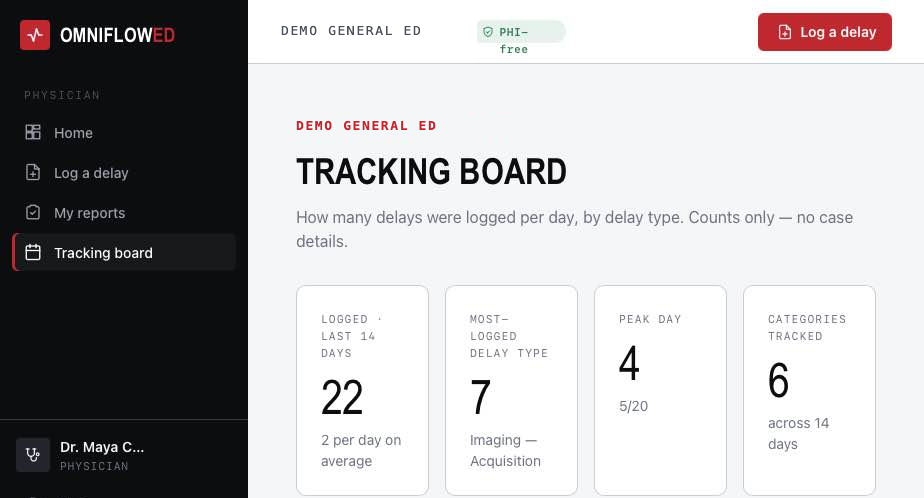
- Tracking board: the current state of the department’s open delays at a glance.
- CSV export: everything, for the quality review you already run.
What it is not
Deliberate omissions.
- No per-clinician analytics. There is no view that ranks, scores or compares individuals, because a tool with one stops being used.
- No patient identifiers. Not optional, not configurable, not present.
- No chart integration. OmniFlowED never reads or writes the medical record.
Questions
Does OmniFlowED store any patient information?
No. A delay is identified only by zone, room and the two stage timestamps. There is no field anywhere in the product for a patient name, medical record number, date of birth, age or chief complaint, and the optional free-text note runs a live guard that flags anything resembling an age, a date or an MRN before the report can be filed.
Is this a safety event or incident report?
No. A delay log is not a safety event, not peer review, and not part of the medical record. It records that a step in the workup took longer than it should have, and which systemic factor caused it.
Can a physician be identified from a report?
Only if they choose to be. Attribution is selected per report, not once at sign-up, so a physician can file named entries and anonymous entries the same shift. Administrative analytics are aggregate either way and are organised by contributing factor, category, zone and shift, never by clinician.
How long does logging a delay take?
Two screens. Category and subtype come from controlled lists, the duration is computed from the two stage timestamps you enter, and quick-log shortcuts pre-fill the categories you file most often.
How does it fit with our EHR?
It sits alongside it. The EHR knows when an order was placed and resulted; it does not know that the consult was paged three times or that transport was two hours behind. OmniFlowED captures that layer, and every report exports to CSV for your existing quality review.
What does a pilot involve?
You send us your department's zone and room layout, we configure it, and your physicians sign in. Pilots are free, and you keep your data as CSV whether you continue or not.
Does this address ER overcrowding, or just individual delays?
Both. Each log is one delay, but the aggregate is where ER overcrowding shows its causes: which contributing factor, in which zone, on which shift, is driving boarding and wait times. That is the level administration needs to act on capacity.
Two screens on shift. Nothing to chart.
A pilot costs your physicians a few seconds per delay and gives the department a month of real throughput data.